Describe the season and ChalkLine's AI drafts every game, checks every rule and explains every choice. Then your county runs every change and tournament from one shared, conflict-checked schedule.
Type what you need the way you'd say it at a council meeting. ChalkLine's AI turns it into rules, the conflict engine checks every game against every field, blackout and county policy, and a full draft comes back with a reason for every date. ADs review it. The council chair publishes it.
Demo, described: the council chair types “Build the fall boys soccer schedule, JV and varsity, for all 13 schools. 12 league games each, no home games during a school's homecoming week, keep Friday nights free for football, and share Crofton's turf fairly.” ChalkLine reads it as 9 rules, 5 from the request and 4 from county policy, checks 1,274 field slots, and drafts 156 games for 13 schools with 0 hard violations and 3 soft notes, each explained. Example: Meade at Crofton is on Tue, Oct 13 because Crofton's turf is booked for football on Thu, Oct 15. The draft goes to all 13 athletic directors for review, and only the council chair publishes it.
Season builder · Fall 2026 · Boys soccer
Waiting for a request
Dana Whitfield · council chairMon, Aug 3, 8:40 AM
Build the fall boys soccer schedule, JV and varsity, for all 13 schools. 12 league games each, no home games during a school's homecoming week, keep Friday nights free for football, and share Crofton's turf fairly.
Describe the season…
Plain English. No forms. Draft the season
Rules ChalkLine read· 5 from the request, 4 from county policy
13 schools, JV and varsitySetup
12 league games eachHard
No home games in homecoming weekHard
Friday nights free for footballHard
Crofton turf shared with footballSoft
2 or more rest days between gamesHard
No field double-bookedHard
Home and away balancedSoft
Under 45 min travel on school nightsSoft
Working
Turned your request into 9 rules, 4 from county policy
Checked 1,274 field slots at 13 schools
Placed 78 matchups, JV and varsity the same night
Found 5 conflicts on the first pass
Resolved all 5: 3 moved, 2 home and away flipped
Balanced home and away: 6 and 6 for every school
Draft A · varsity shown, JV plays the same nights
H home · A away Conflict Fixed
Wk of Sep 7Wk of Sep 14Wk of Sep 21Wk of Sep 28Wk of Oct 5Wk of Oct 12Wk of Oct 19ANN
ByeARU H Thu
BRD A TueCHE A ThuConflictFixed
CRO A TueGLB H Thu
MEA A TueNCO A Thu
NEH H TueOLM H Thu
SVP A TueSRV H Thu
SOU H TueBye
ARU
SOU A TueANN A Thu
ByeBRD H Thu
CHE A TueCRO A Thu
GLB H TueMEA H Thu
NCO H TueNEH A Thu
OLM H TueSVP H Thu
SRV A TueBye
BRD
SRV A TueSOU H Thu
ANN H TueARU A Thu
ByeCHE H Thu
CRO A TueGLB A Thu
MEA A TueNCO H Thu
NEH H TueOLM H Thu
SVP A TueBye
CHE
SVP A TueSRV H Thu
SOU A TueANN H Thu
ARU H TueBRD A Thu
ByeCRO H Thu
GLB A TueMEA A Thu
NCO H TueNEH H Thu
OLM A TueBye
CRO
OLM A TueSVP H Thu
SRV A TueSOU A Thu
ANN H TueARU H Thu
BRD H TueCHE A Thu
ByeGLB H Thu
MEA H TueNCO A ThuConflictFixed
Why this date?
Meade at Crofton, Tue, Oct 13
Moved from Thu, Oct 15: Crofton's turf is booked that night for varsity football.
Turf free, JV 4:15 and V 6:00 PM
2 rest days for both teams
Outside both homecoming weeks
Friday night left free
NEH A TueBye
GLB
NEH H TueOLM A Thu
SVP A TueSRV H Thu
SOU H TueANN A Thu
ARU A TueBRD H Thu
CHE H TueCRO A Thu
ByeMEA A ThuConflictFixed
NCO H TueBye
MEA
NCO A TueNEH A Thu
OLM H TueSVP H Thu
SRV A TueSOU A Thu
ANN H TueARU A Thu
BRD H TueCHE H Thu
CRO A TueGLB H Thu
ByeBye
NCO
MEA H TueBye
NEH A TueOLM H Thu
SVP H TueSRV A Thu
SOU H TueANN H Thu
ARU A TueBRD A Thu
CHE A TueCRO H Thu
GLB A TueBye
NEH
GLB A TueMEA H Thu
NCO H TueBye
OLM A TueSVP H Thu
SRV H TueSOU A Thu
ANN A TueARU H Thu
BRD A TueCHE A Thu
CRO H TueBye
OLM
CRO H TueGLB H Thu
MEA A TueNCO A Thu
NEH H TueBye
SVP A TueSRV H Thu
SOU H TueANN A ThuConflictFixed
ARU A TueBRD A Thu
CHE H TueBye
SVP
CHE H TueCRO A Thu
GLB H TueMEA A Thu
NCO A TueNEH A Thu
OLM H TueBye
SRV A TueSOU H Thu
ANN H TueARU A Thu
BRD H TueBye
SRV
BRD H TueCHE A Thu
CRO H TueGLB A Thu
MEA H TueNCO H ThuConflictFixed
NEH A TueOLM A Thu
SVP H TueBye
SOU A TueANN A Thu
ARU H TueBye
SOU
ARU H TueBRD A Thu
CHE H TueCRO H Thu
GLB A TueMEA H Thu
NCO A TueNEH H Thu
OLM A TueSVP A Thu
SRV H TueBye
ANN A TueBye
Games, JV and varsity
156
Games, JV and varsity
Hard violations
0
Hard violations
Soft notes, explained
3
Soft notes, explained
To draft
38 s
To draft
SoftSouthern at North County, Tue, Sep 22: a 56 min drive on a school night.
SoftOld Mill plays 3 away games in a row, Thu, Oct 8 to Thu, Oct 15.
SoftAnnapolis's homecoming week (Sep 14) has 2 away games. Your rule only blocks home games.
Draft A ready0 hard violations · drafted in 38 s
Sent to 13 ADs for review13 of 13 signed off · 1 flag resolved
Published by the council chairMon, Aug 17, 9:05 AM · calendars updated
The AI drafts. People decide: nothing is official until the council chair publishes.
Accelerated for this demo
Weeks of spreadsheets, one afternoon
A full league season comes back in under a minute. What's left for you is judgment, not arithmetic.
Every rule checked, every date explained
Hard rules are never broken. Soft ones are traded off in the open, and any game answers “Why?”
People make it official
Every AD reviews their own school's games first. Only the council chair can publish.
Re-plan a rainout week in seconds
Lose a week to weather and ask for makeups. Every option still passes every rule.
The 1:30 PM rainout
One rainout. Twelve phone calls.One request.
Today a postponement means an afternoon of calls, texts and emails, then days negotiating a makeup date. In ChalkLine the home AD sends one structured request. The other AD accepts, counters or declines, and everyone downstream hears once it's settled.
That only works if every school is on it. So the county sets ChalkLine up once and invites every athletic director. Both sides of every game are in the same system from the first day.
Karen Doyle, Broadneck AD
Can we do Tuesday instead?
Soccer officials assignor
Need the new time before 3.
Broadneck transportation
Bus already dispatched?
Athletic trainer
Am I still on for Wednesday?
Custodial lead
Do we line the field or not?
JV head coach
Parents are asking.
Varsity head coach
Tuesday works if JV moves too.
Administrator on duty
Who's covering the makeup?
Broadneck head coach
We play Thursday already.
County office
League game inside 48 hours?
Local sports desk
Is tonight's game still on?
Public calendar
Still shows Wednesday 6:00 PM
Change requestSent 7:15 AM
Broadneck at South River, Boys Soccer
Wed, Oct 7 → Tue, Oct 13 · JV 4:15, V 6:00 PM
Conflicts checked for both schools
Karen Doyle accepts from her phone
The council approves in one click
11 people notified once, calendars updated
0 → 1
Calls, texts and emails become one request
0 h 0 m
From request to applied in the demo reschedule
0
People notified once, after everyone agrees
0
Changes made silently. Every edit is in the audit log
How it works
From sign-up to game day.
Follow one county from the morning its head of athletics sets it up to its first rainout. Six chapters, every screen straight from ChalkLine.
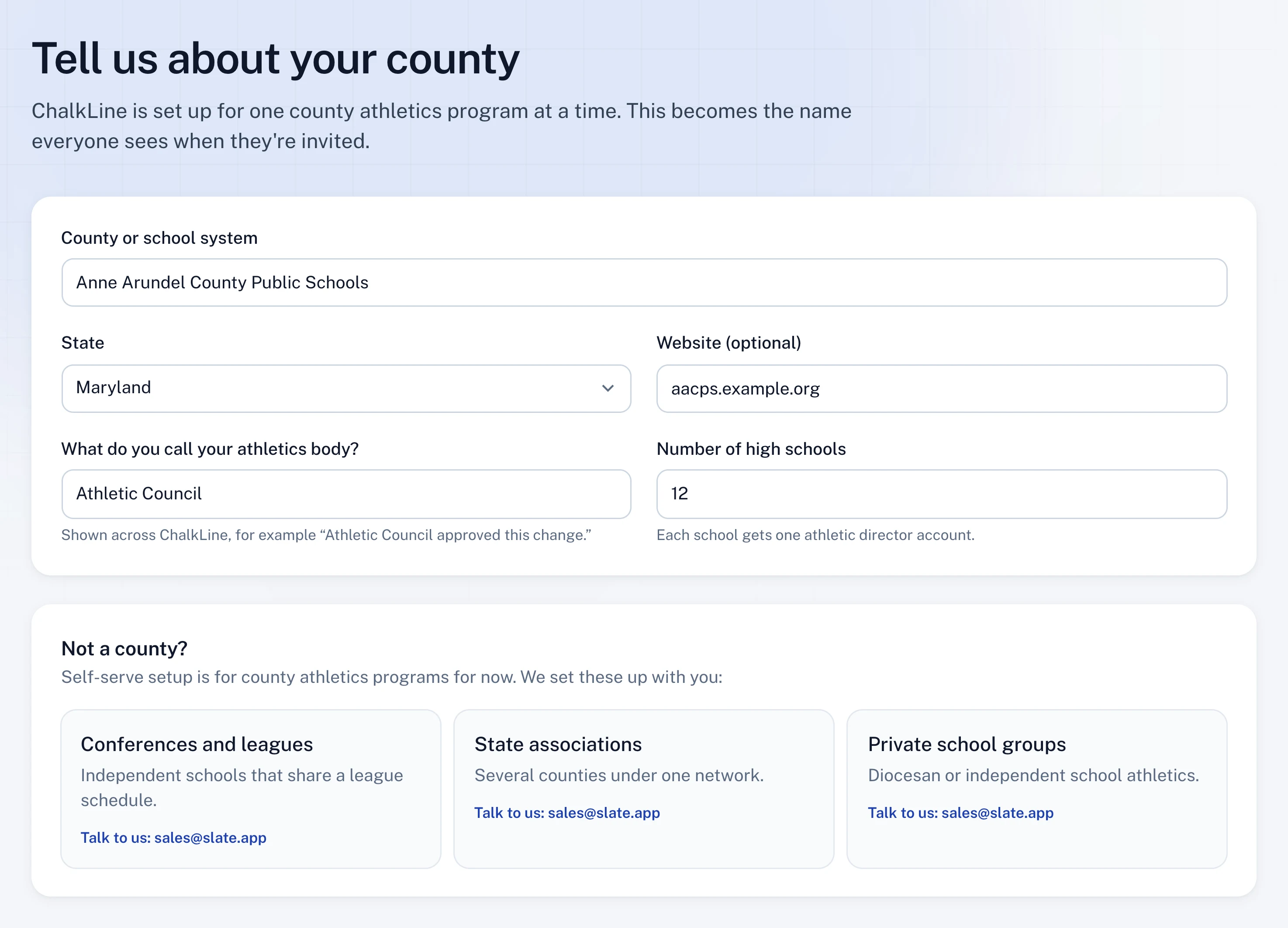
Chapter 1: Set up your county. You set up the county. Nobody else can create an account.
Tell ChalkLine about your county. Dana names the school system and its athletics body. That name is what every AD sees in their invitation.
Match how you're organized. The council at the top, an athletic director for each school, coaches under each AD, and read-only seats for the board.
Pick a plan and start the pilot. The County plan, billed annually. Setup is waived, and nothing is charged until the 30-day pilot ends.
Add every school and its AD. Paste the list from a spreadsheet. ChalkLine suggests each three-letter code, and every row becomes an invitation.
Chapter 2: Invite your athletic directors. Everyone joins by invitation, so each person lands in the right school with the right access.
Review and send every invitation. Each AD and council member gets a single-use link and code that expires in 14 days. One click sends them all.
Watch the county join. Waiting and Accepted update as each athletic director signs in. Resend or revoke any invitation from here.
Chapter 3: An athletic director joins. An AD is ready in minutes, not after a training day.
The invitation. Sam sees who invited him, his school, and exactly what he'll be able to do before he signs up.
One click with Google. No new password. His account is tied to Crofton from the first sign-in, and Dana can see that he accepted.
A first-day checklist. Teams, facilities, blackout dates, coaches, notifications and the league schedule. Most steps take a minute.
Chapter 4: Build the schedule. Both schools work in the same system, so every game exists once, confirmed by both.
The council publishes the league. Season builder drafts are checked against every rule. Publishing makes every league game Official for every school at once.
An AD adds a non-league game. Marcus proposes Girls Soccer against Chesapeake with a linked JV game. The conflict check runs as he types.
The other AD confirms. Nina sees the game checked against Chesapeake's own schedule and confirms it in one click.
Official for both schools. The game lands on both schedules, the public schedule and every calendar feed at the same moment.
Chapter 5: When something changes. A reschedule is one request, not twelve phone calls.
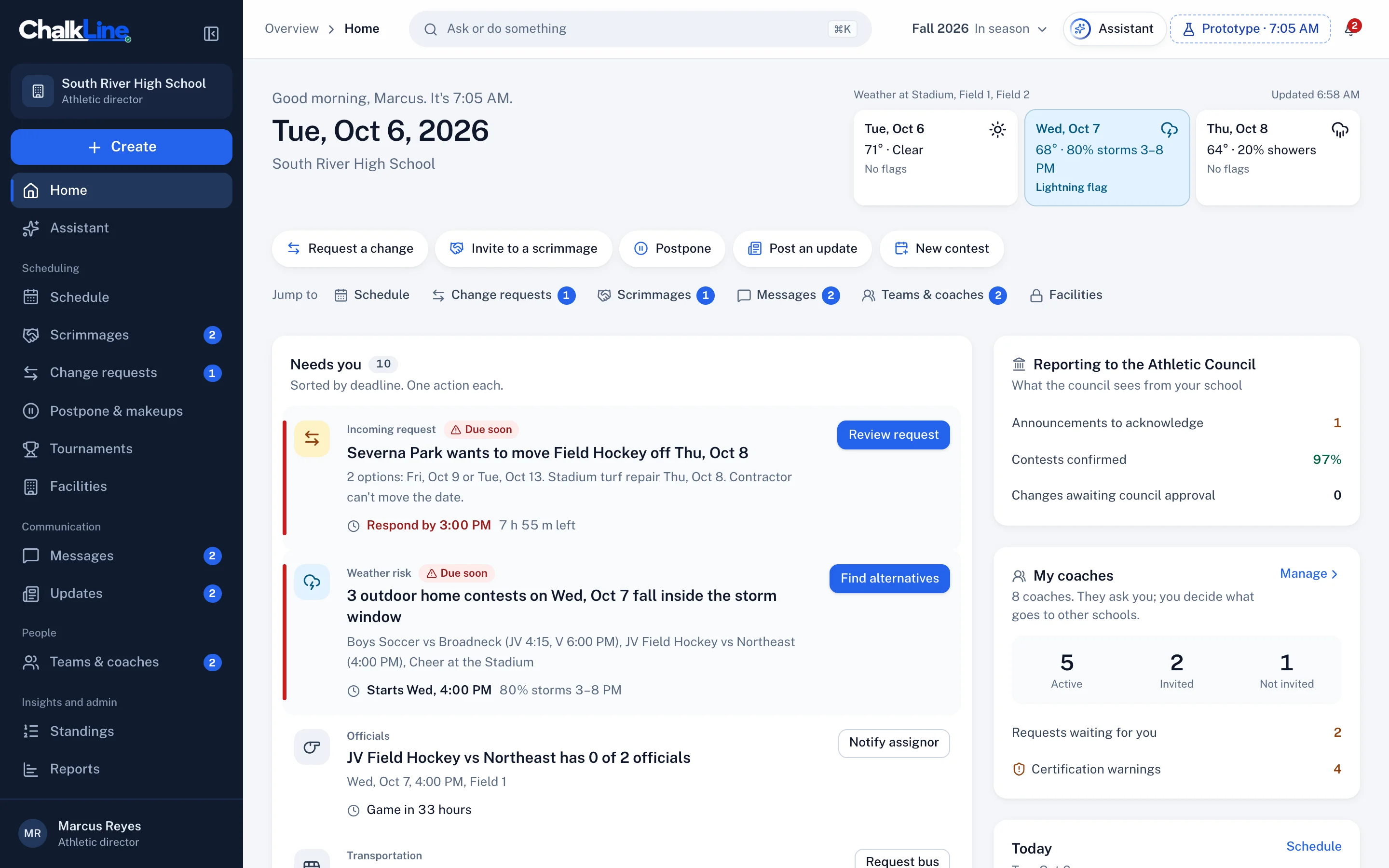
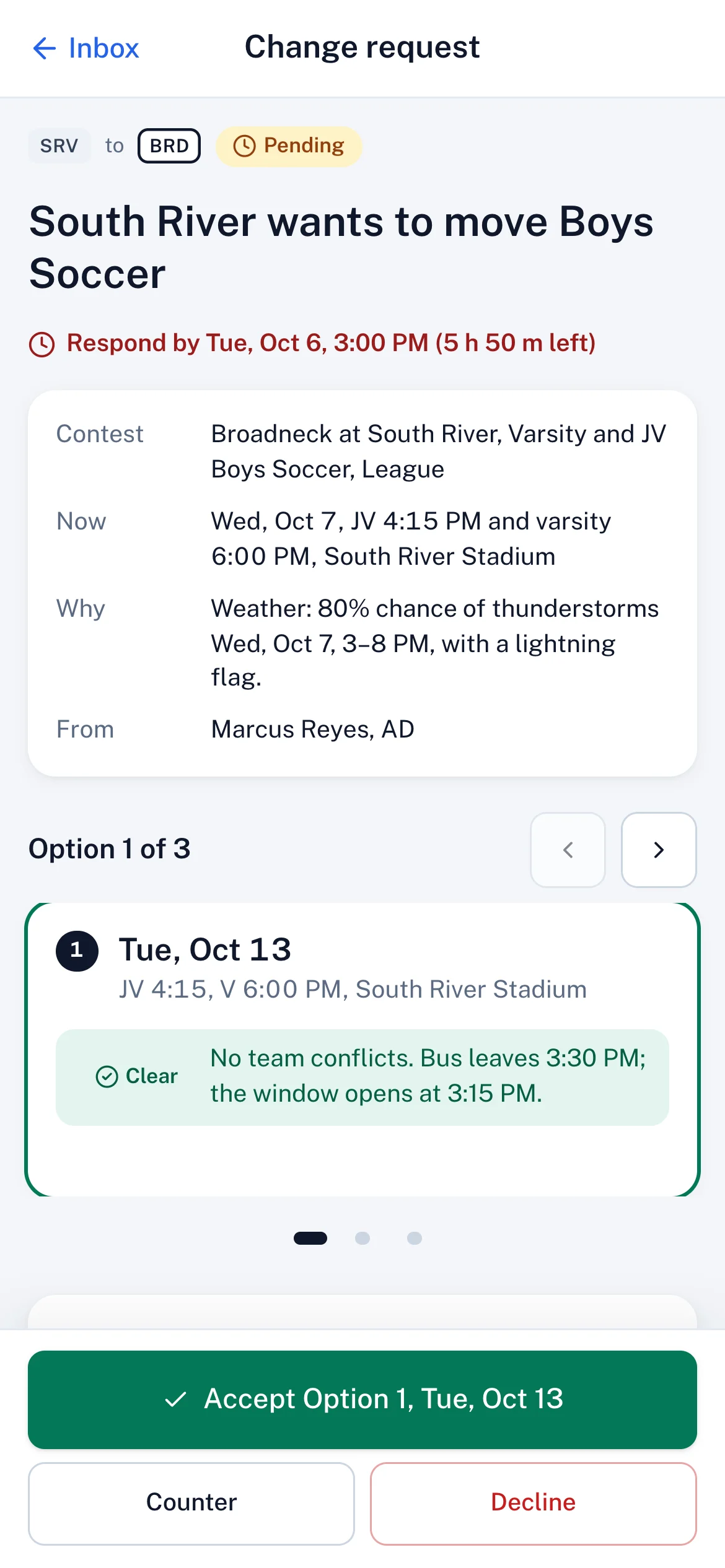
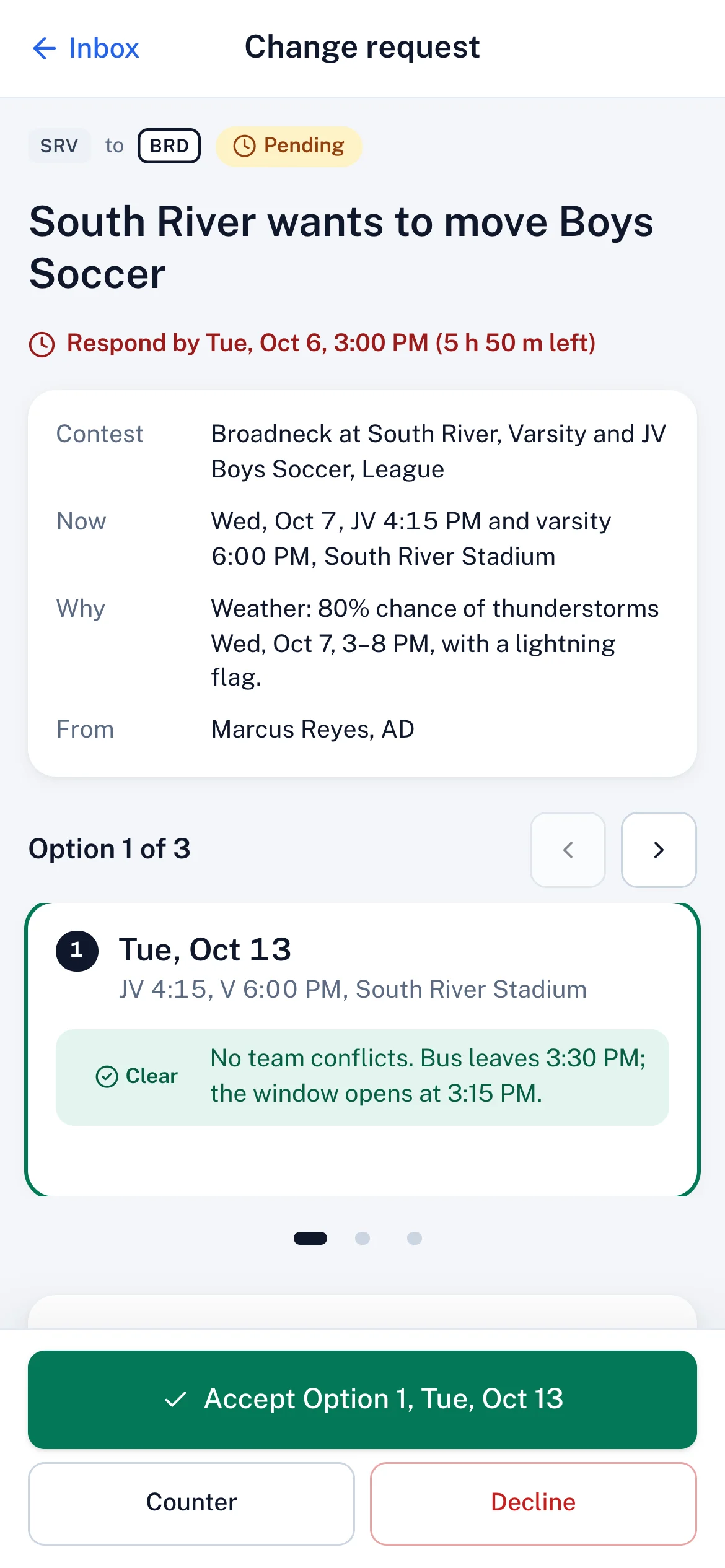
Storms on Wednesday. Assist checks both schools and the stadium, then returns three valid dates with anything soft flagged.
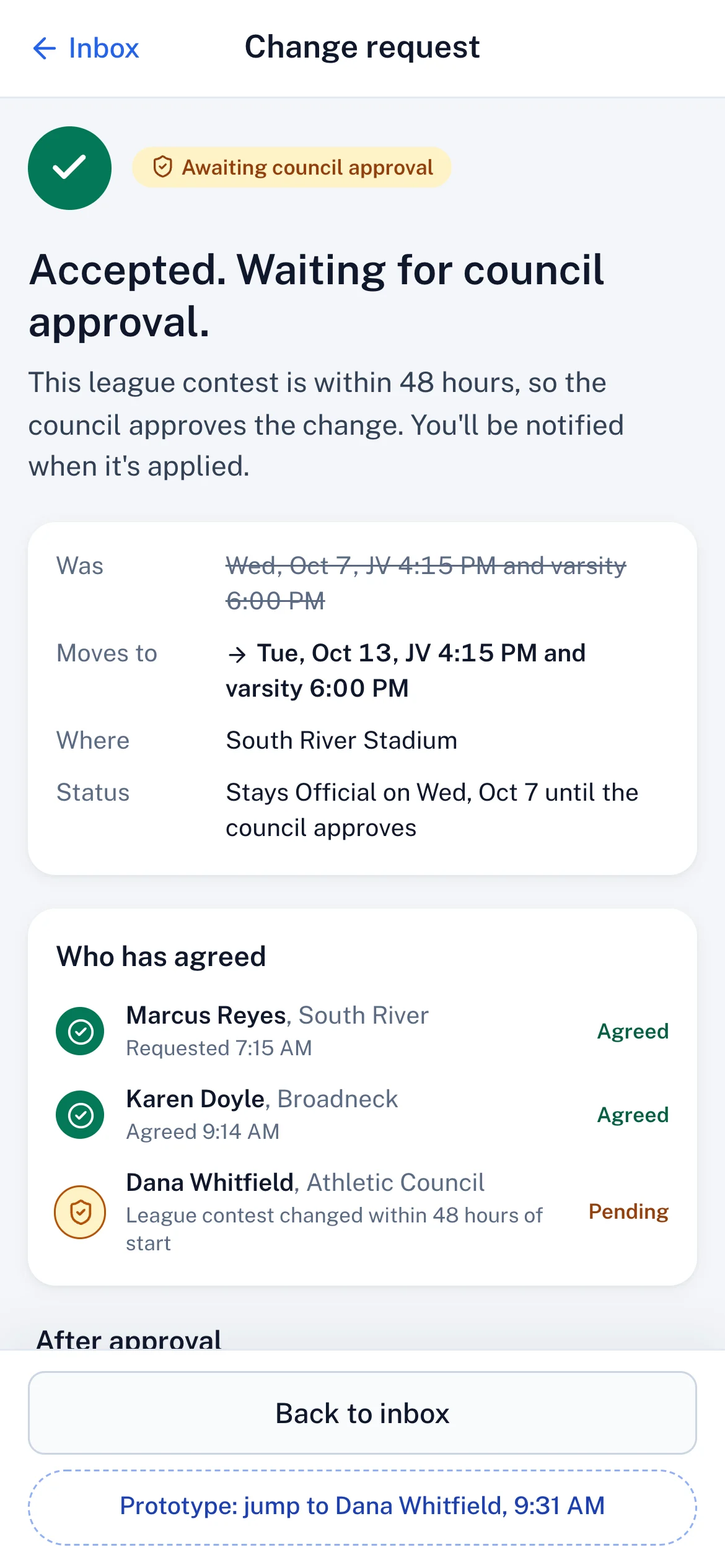
Accepted from the sideline. Karen accepts Option 1 on her phone. Because it's a league game within 48 hours, it goes to the council.
Approved in one click. The game moves to Tue, Oct 13. Eleven people and the public schedule are told once, when it's final.
Chapter 6: Everyone sees it. From the council to the coach, everyone works from one schedule.
The coach already knows. Marco sees the move, who approved it and when it was, next to his certification reminders.
Game day on the phone. Lightning stops play. The 30-minute timer tells both teams, the officials and staff at once.
Results roll up. Scores feed the standings and the seeding line for the council and the board, with no spreadsheet in between.
Chapter 1 of 6
Set up your county
DWDana Whitfield · Head of athletics
Step 1 of 4
Tell ChalkLine about your county
Dana names the school system and its athletics body. That name is what every AD sees in their invitation.
You set up the county. Nobody else can create an account.
Set up your county this afternoon.
Invite your athletic directors today, and run your first week in ChalkLine before the first invoice.
One network. Three levels. Everyone in the same schedule.
Athletic Council
Sets up the county and organizes everyone
You sign up the county, invite every athletic director and own the season: league schedules, rules, tournaments and weather calls. Every school's day is on one board, and you approve the changes your policy says you should.
Today across the county, on one board
Season builder and tournament draws
Approvals, audit log and equity reports
How they join: Signs up the county. Invites council members, board observers and one AD per school.
Accounts are created by invitation
1Council creates the county
2Invites each school's AD
3ADs invite staff and coaches
Every account comes from a secure invite link or code, so each person lands in the right school with the right access.
chalklineathletics.com/council
chalklineathletics.com/council
For the Athletic Council
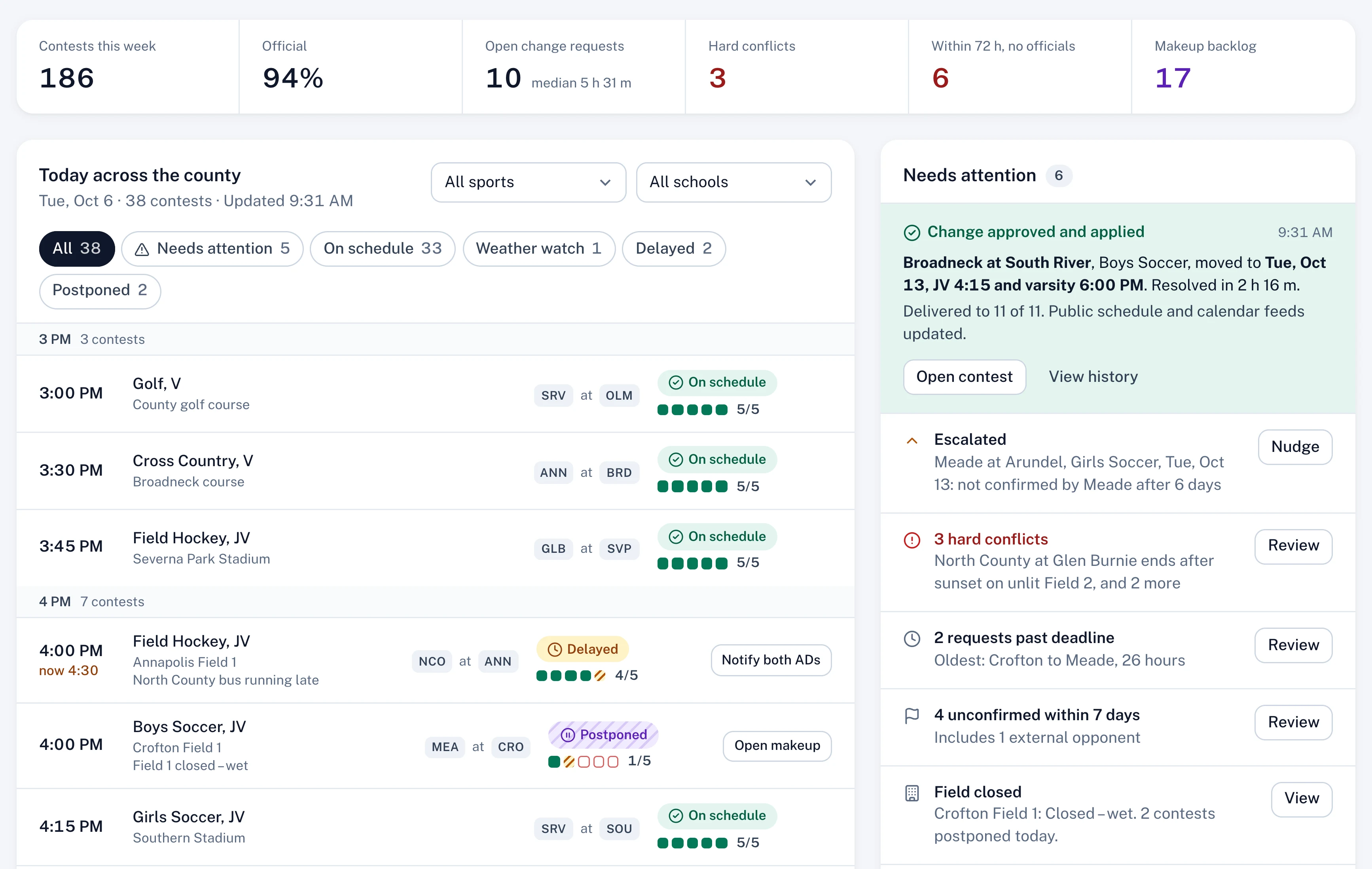
See the whole county at once.
Every game in the county, updating as it happens. Delays, closures and weather calls surface on their own, with the next step already attached.
Today across the county
Tue, Oct 6 · 38 contests
Live3:52 PM
Running8Needs attention0Final0
3:00 PMGolf, VBay Hills County Golf CourseSRVatOLMIn progress5/5
Showing 8 of 38 · demo data from Anne Arundel County Public Schools, Fall 2026
Needs attention
0
Every game is on schedule.
Every school
13 schools and 38 games today on one board, not 13 spreadsheets.
Seconds, not phone trees
A delay posted at a field reaches both ADs, officials and buses at once.
Next step attached
Each problem arrives with the action that fixes it.
Everything the season needs
Built for the work between the games.
Change requestsConflict engineScrimmagesTournaments and drawsSeason builderSchool updatesFacilities timelineGame-day sheetLightning delay timerMakeup queueSystem-wide weather callsAudit logAssistDelivery receiptsPublic schedule and calendar feeds
Change requestsConflict engineScrimmagesTournaments and drawsSeason builderSchool updatesFacilities timelineGame-day sheetLightning delay timerMakeup queueSystem-wide weather callsAudit logAssistDelivery receiptsPublic schedule and calendar feeds
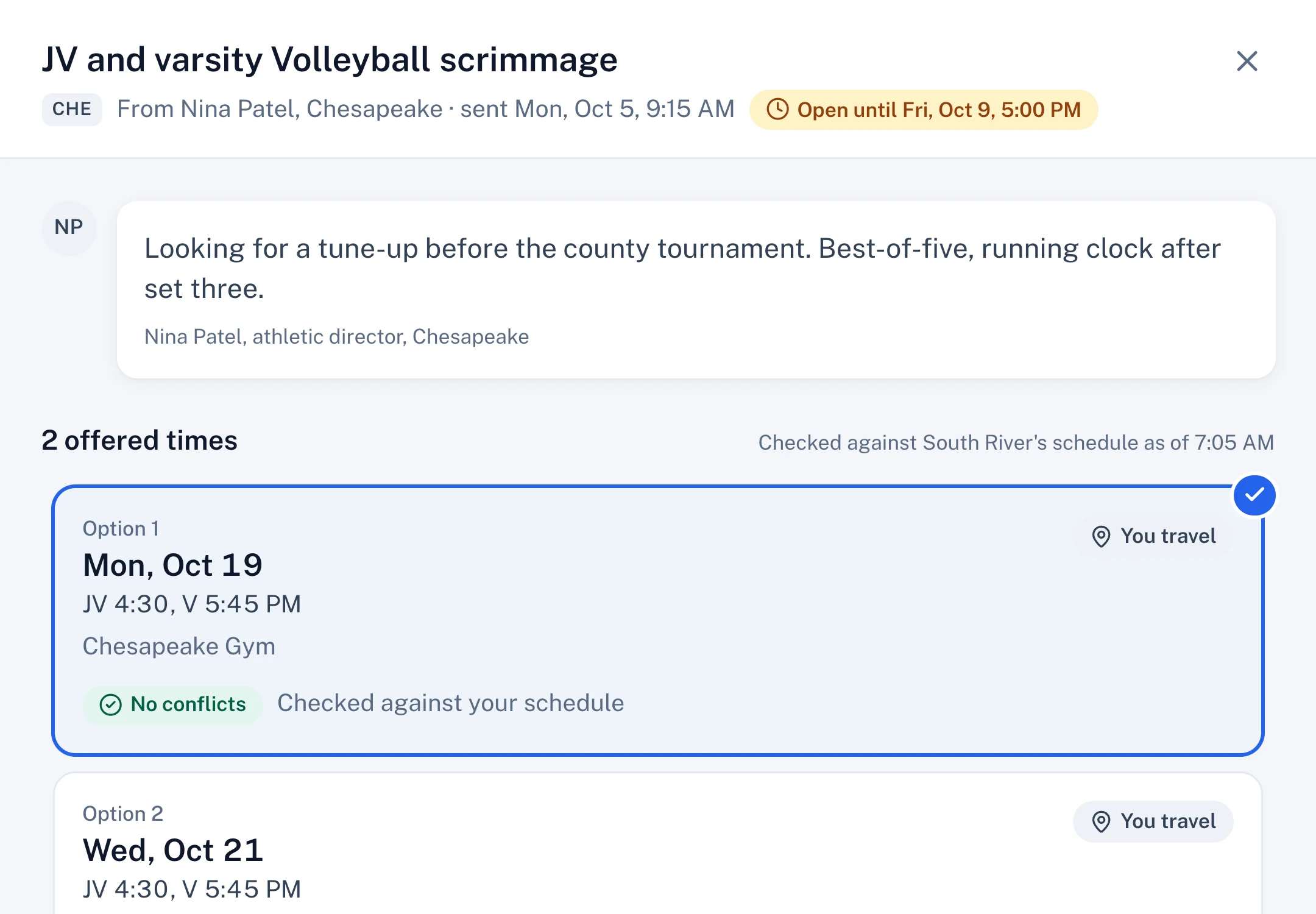
Scrimmages, straight between ADs
Invite specific athletic directors or post an opening to the network board. The first acceptance books it for both schools.
Offer up to three times, each checked against your schedule
Other schools show only as free or busy
A thread per invitation, so the back-and-forth stays with it
chalklineathletics.com/…/director/scrimmages
chalklineathletics.com/…/director/scrimmages
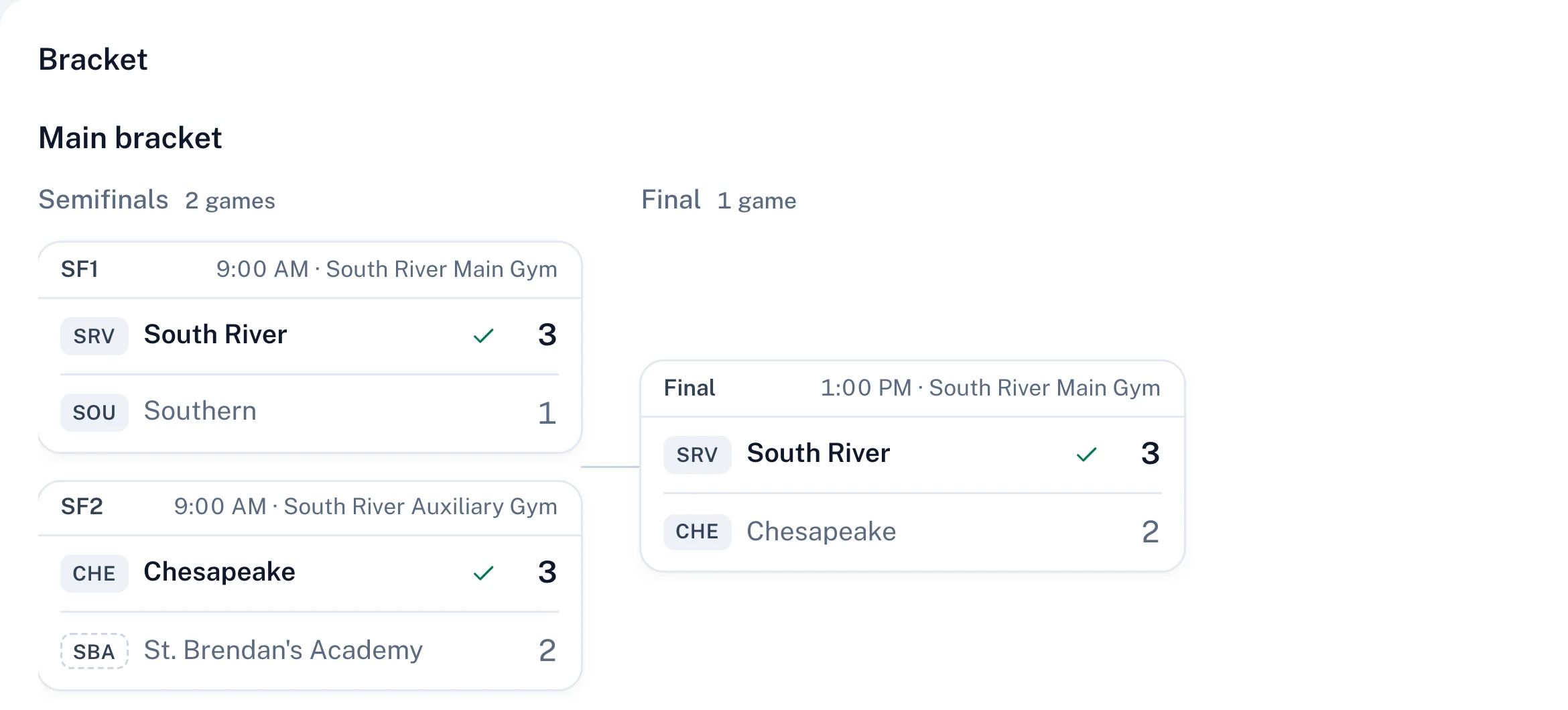
Tournaments and draws
Seeded or random-pot draws that can be re-run from their seed, a bracket with a consolation round, and a venue-by-time grid that respects rest and travel.
Invite schools and collect entries
Publish, then enter scores to advance the bracket live
Every draw is recorded in the audit log
chalklineathletics.com/council/tournaments
chalklineathletics.com/council/tournaments
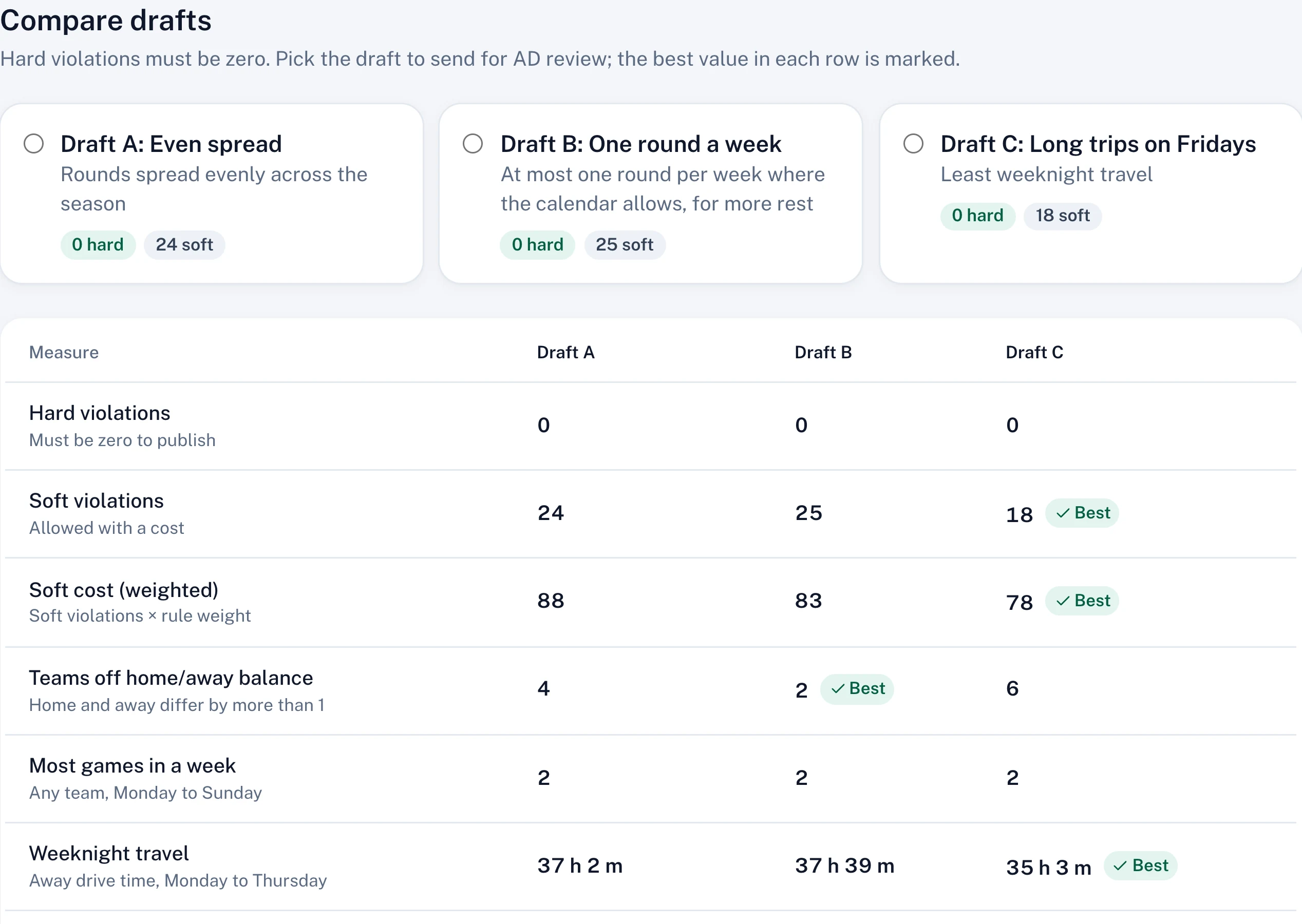
A season builder that shows its work
Teams, divisions, blackouts, rules and gym availability in one place. Generate drafts, compare them side by side, and publish with zero hard violations.
Rules from templates, each with a weight
Why? on every flagged week
AD review window before anything is published
chalklineathletics.com/council/season-builder
chalklineathletics.com/council/season-builder
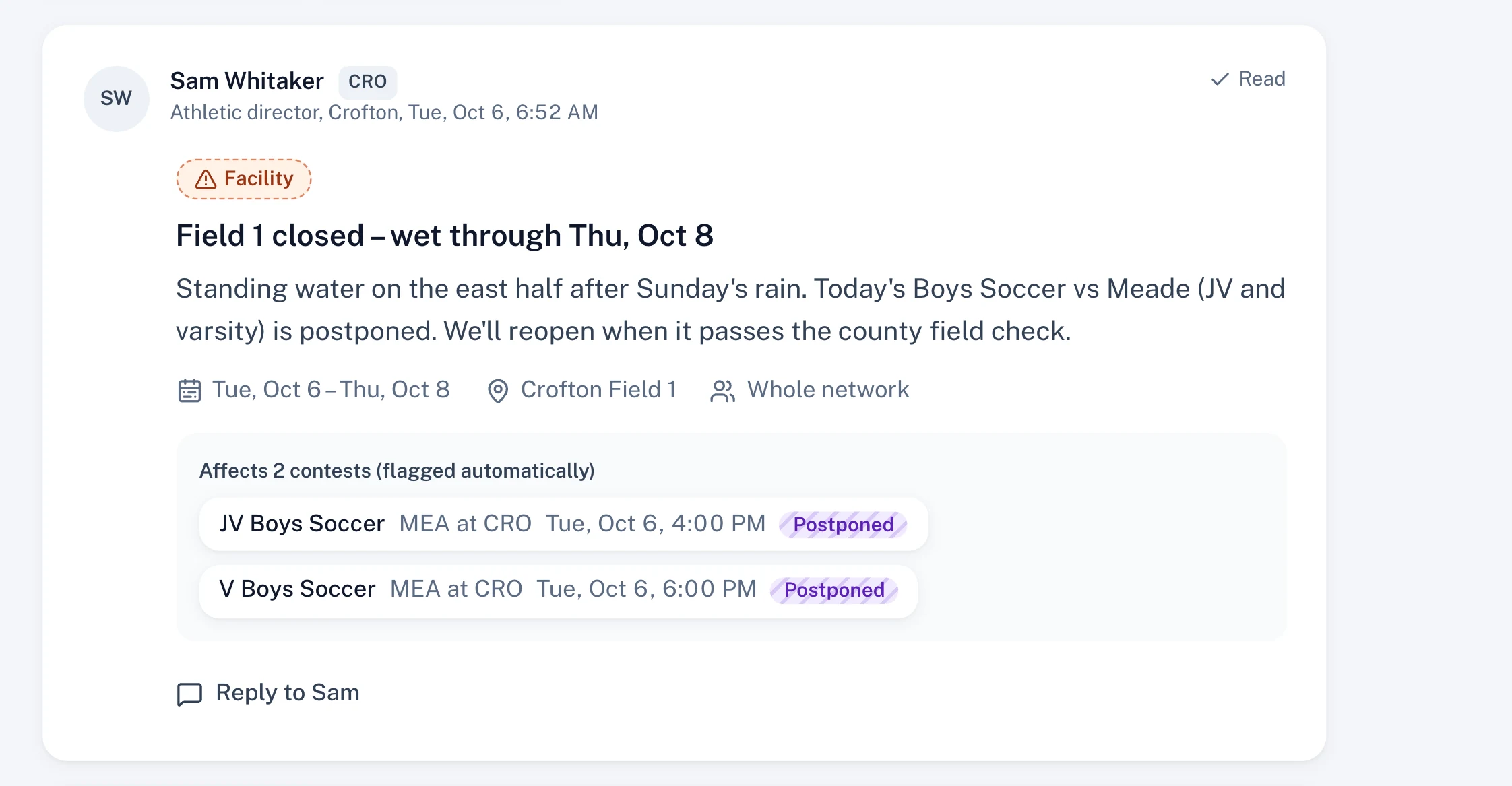
School updates the whole county sees
A field closure, a school closure or homecoming week is posted once. Affected contests are flagged automatically for both schools.
Audience: the network, the council, or chosen schools
Announcements with required acknowledgment
Read and acknowledged, tracked per school
chalklineathletics.com/…/director/updates
chalklineathletics.com/…/director/updates
Facilities without double-booking
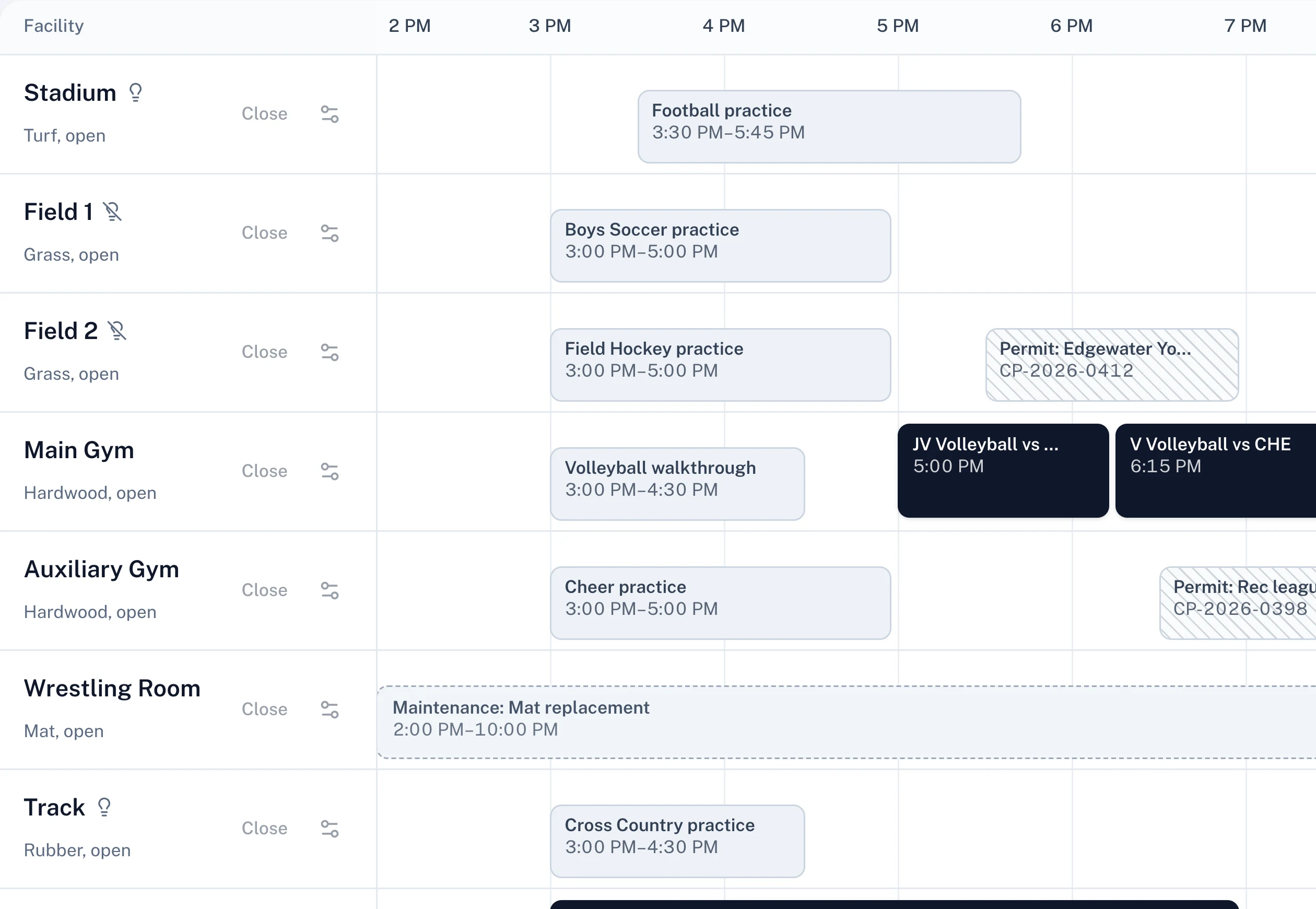
Contests, practices, community permits and maintenance on one timeline. A contest can move a practice with notice; it never silently displaces a permit.
Close a field and see every affected contest
Sunset limits for unlit fields
Turnaround buffers per facility
chalklineathletics.com/…/director/facilities
chalklineathletics.com/…/director/facilities
Teams, coaches and certifications
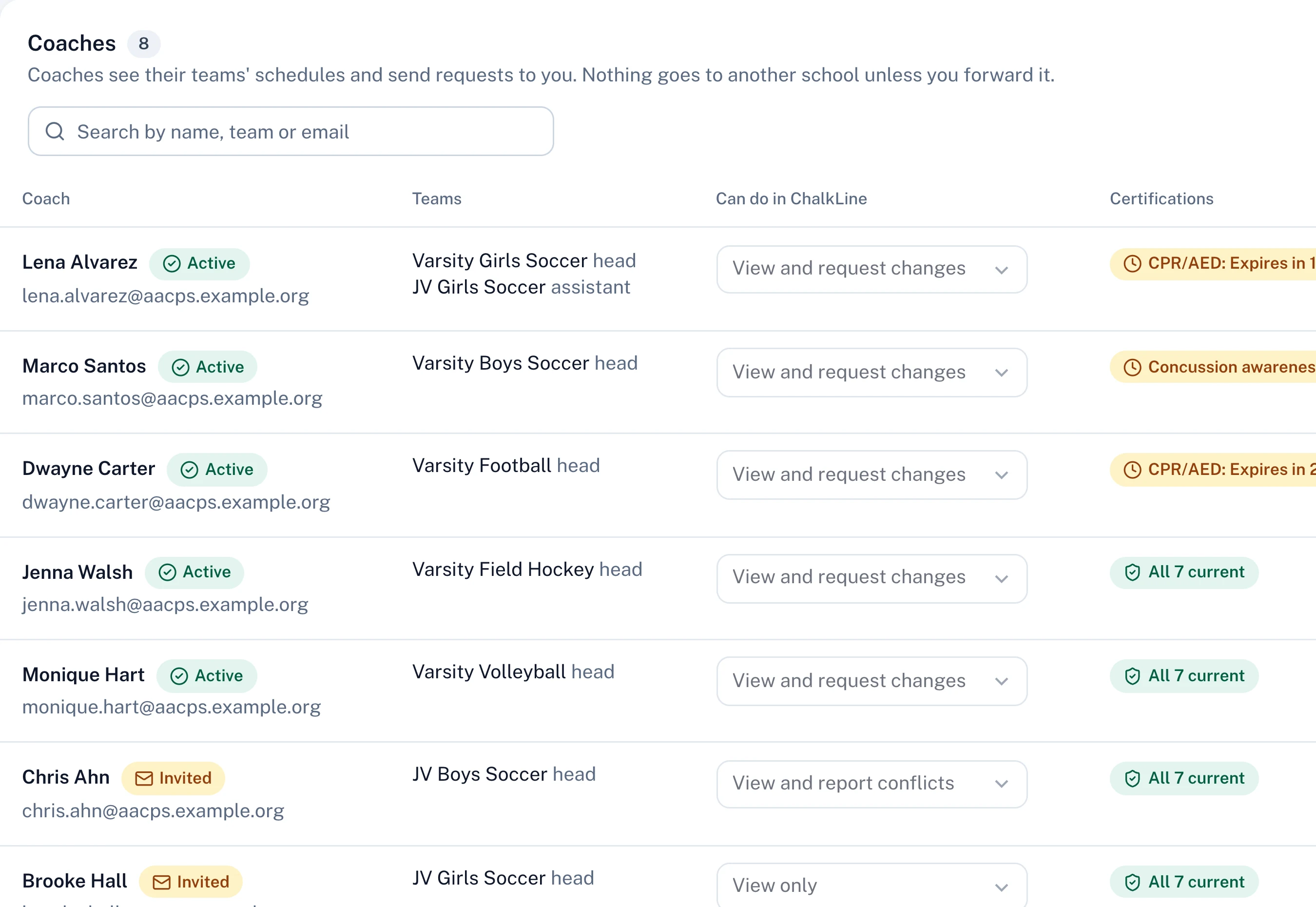
ADs invite coaches, set what each can do, and see every certification's expiry date before it becomes a problem.
Reminders before CPR/AED or concussion training lapses
Coach requests land in the AD's inbox for a decision
chalklineathletics.com/…/director/teams
chalklineathletics.com/…/director/teams
chalklineathletics.com/…/director/scrimmages
1 / 6
On the sideline
Built for the sideline.
ADs make the calls that matter at 3:30 PM on a wet field, not at a desk. Every decision in ChalkLine works one-handed on a phone.
One-handed approvals
Accept, counter or decline a request straight from the notification.
Postpone in three taps
Pick a reason, confirm, done. Both schools, officials and buses hear at once.
Lightning timer
30 minutes from the last strike, per county policy. Everyone is told when play stops and when it resumes.
Designed for bad signal
Designed to queue your actions and send them the moment you're back online.
Tuesday, October 6
9:10
9:10 AM · one notification
Game-day sheet
Broadneck at South River
Varsity Boys Soccer · Stadium
Play stopped 6:42 PM
30:00
until play can resume
Last strike
6:42 PM
Resume at
7:12 PM
Both teams: told play stopped
Officials (3): told play stopped
Game-day staff (7): told play stopped
New strikeResume play
Accelerated for this demo
Trust, by design
Public infrastructure should be boring to trust.
ChalkLine is the official record for every contest in the county. It's designed that way from the first screen: nothing changes without the right people agreeing, and everything that changes is written down.
No student data
Version 1 holds no student personal information. Rosters are a count, not a list of names.
Google and Microsoft sign-in
Staff sign in with the accounts your district already manages. No new passwords to lose.
Access by level
The council, athletic directors and coaches each see what their role needs, enforced on the server, not just hidden in the interface.
Private by default between schools
When you look for a date, other schools appear only as free or busy. Their internal events stay theirs.
An audit log that can't be edited
Who, what, when, why, before and after, for every change. Disputes are settled with the record, not memory.
Hosted in the United States
Data is planned to be stored and processed in U.S. regions, with encryption in transit and at rest.
Statements describe how ChalkLine is designed. Formal certifications are not claimed.
Pricing
One price for the whole county.
Priced per organization, not per seat. Every AD, office staff member, coach and council member is included.
Multiple counties or a state association · 26 or more schools
Custom
Talk to us about your network
Everything in County
Multiple councils under one network
Custom rules and approval policies
Data export and API access
Dedicated success manager
$2,500 setup, onceOne-time onboarding: schedule import, rules setup and a live training for your ADs. Waived on annual plans.
30-day pilotRun a full season slice with your ADs before the first invoice.
Unlimited usersInvite every AD, office staff member, coach and council member at no extra cost.
Prototype pricing, shown for illustration.
Questions
Asked by athletic directors.
Something else? Your council can reach us during the pilot, and every answer here is how the product works today.
By invitation only. The council sets up the county and invites each school's AD with a secure link or a short invite code. ADs then invite their office staff and coaches the same way. Nobody can sign up into a school on their own, so everyone lands in the right place with the right access.
Bring every school onto one schedule.
Set up your county in an afternoon. Invite your athletic directors by link, and run your first week in ChalkLine before the first invoice.